DW Spectrum User Manual
Key Concepts
•Cloud accounts can be standalone; or connected to a Site, an Organization, or a Channel Partner.
•Disconnecting a Site from a Cloud Account will convert the Site to a local Site.
•A cloud-connected Site can be directly transferred to another cloud account.
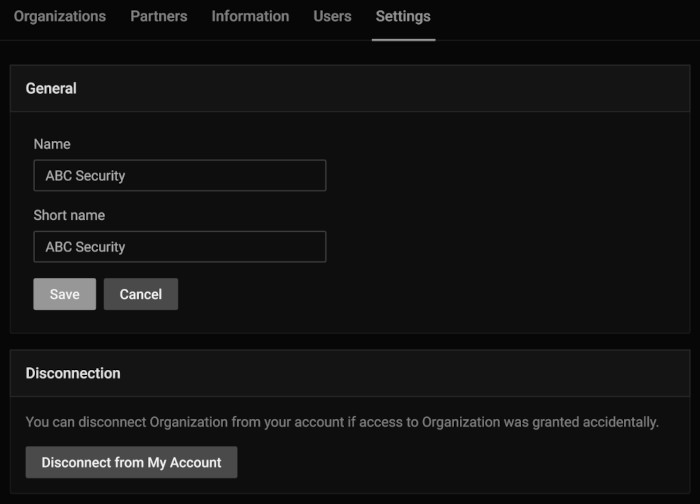
•Cloud users can choose to disconnect their account from an Organization or Channel Partner to revoke their own access and disassociate their account from entities they no longer manager or wish to participate in.
Transferring a Cloud Connected Site
See Changing Cloud Owner for further instructions.
Disconnect Cloud Account from a Site
Using the Desktop Client:
1.Open the Main Menu > Site Administration dialog.
2.Select the DW Cloud settings tab.
3.Click the Disconnect Site from Cloud button.
4.Confirm and complete the action.
Using the Web Admin / Cloud Portal
1.Open the Site in the Cloud Portal.
2.Select Settings in the header menu.
3.Select General in the left menu.
4.Click the Disconnect Site from Cloud button.
5.Confirm and complete the action.
Disconnect Account from an Organization or Channel Partner
1.Using the Web Admin / Cloud Portal to open the Site
2.Select set Settings tab in the heading menu.
3.Click on the Disconnect from my Account button.
4.Review summary of access changes.
5.Click on the Disconnect button to complete the action.