DW Spectrum User Manual
This topic outlines the process to upgrade an existing Cloud-Connected Professional Edition Site to an Enterprise Edition Site.
Key Concepts
•Once a Professional Edition Site is upgraded to an Enterprise Site, it cannot be undone.
•The Professional to Enterprise upgrade can only be performed in the Cloud Portal.
•Upgrades can only be performed by Organization Administrators.
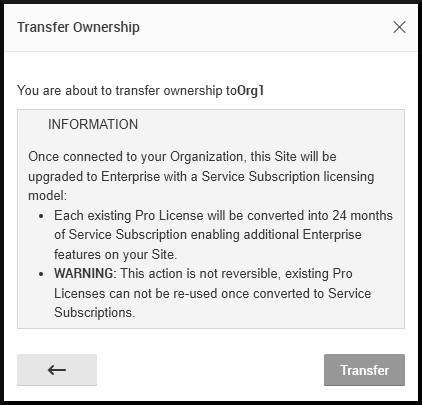
•Each Professional License will be converted into 24-months of Subscription credits.
•Only the Enterprise Editions provides these features, and more:
oUnified notifications across all Sites in an Organization.
oUnified user management and Site access controls.
oAccess to management tools for Subscription Services.
oVideo Wall licenses are included with Enterprise Edition.
oUnlimited Site scalability using the Organization structure.
oDesigned to support new features, services, and integrations.
How to Upgrade from Professional to Enterprise Edition
1.Change the Cloud Owner of the Professional Site to an Organization Administrator.
2.Log in to the DW Cloud Portal as an Organization Administrator.
3.Navigate to the Professional Edition Site that will be upgraded to Enterprise Edition.
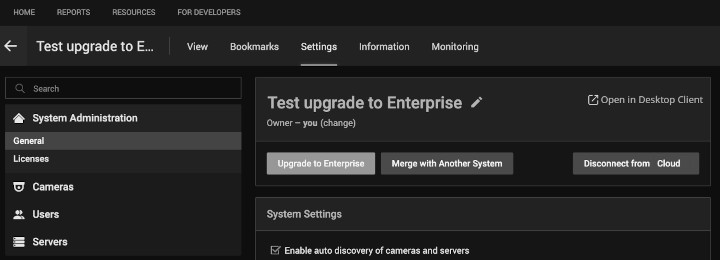
4.Select the Settings tab in heading menu.
5.Select the General tab under the System Administration heading on the left.
6.Click the Upgrade to Enterprise button found just below the Site name.
7.Review the summary of benefits and support options; click Next.
8.Select an Organization to join from the list provided; click Next.
9.Accept the transfer terms by clicking the Transfer button.
10.A confirmation screen will be presented after successful transfer.