DW Spectrum User Manual
An intercom is a visitor-side two-way communication device containing a camera and a microphone. Connected intercoms constantly send audio and video to its DW Spectrum Site. DW Spectrum does not send audio to intercoms unless the user is in an ongoing call with a visitor using an intercom.
The only supported intercom in DW Spectrum is the Hanwha Techwin TID-600R.
Intercom Soft Triggers
The TID-600R intercom has three preconfigured soft triggers:
•Push to Talk requires the operator to activate a soft trigger to begin sending audio (see Using 2-Way Audio).
•Door – opens the relay for the door associated with the intercom.
•Heater – turns on the heater function.
Intercom Layouts
When saving a layout containing an intercom or receiving a call, an intercom layout will appear in the Resource Panel called TID-600R Layout with the following icon  . An intercom layout cannot be deleted unless the intercom is removed from the DW Spectrum Site first.
Receiving and Ending Calls
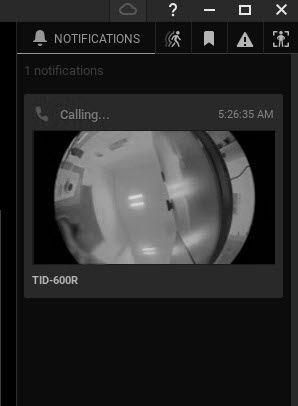
When the visitor initiates a call by clicking a button on the intercom, you will see a notification labeled Calling... in the Notification Panel. Click anywhere on the notification to be taken to the intercom layout (it will be automatically created if it does not already exist), where you can click the Push to Talk soft trigger and begin sending audio to the intercom. Release the Push to Talk soft trigger or close the layout when done speaking to the visitor.