DW Spectrum User Manual
Connecting a Site to an Organization will upgrade existing Professional Editions of DW Spectrum to the Enterprise Edition.
Key considerations before connecting a Site to an Organization:
1.Each recording license key will be converted into a 24-month credit for a Local Recording Service.
2.It is not possible to recover license keys once they are converted into Subscription Service credits.
3.Sites that are disconnected from an Organization will require new recording license keys.
Contact your local DW Spectrum reseller or Digital Watchdog customer service team for more information on the benefits of using Organizations.
There are two ways to connect a Site to an Organization:
•Transfer ownership of a Cloud Connected Site from a Cloud Account to an Organization.
•Connect a local Site to an Organization.
Both methods require a Site Administrator and an Organization Administrator to approve the connection.
Transferring Cloud Connected Sites to an Organization
Prerequisites:
•An Organization must be available.
•The Site to transfer must be accessible via the Cloud Portal.
Transfer Process:
1.Open the Cloud Portal and connect to the Site to be transferred.
2.Switch to the Settings tab in the Cloud Portal.
3.Click the (change) owner text under the Site Name.
4.Select the To Organization in the Transfer Ownership dialog.
5.Select the Organization the Site will be transferred to.
6.Confirm the Transfer action.
7.A Site Administrator and the Organization Administrator must authenticate and approve the transfer.
To Connect a Local Site to an Organization
Desktop Client
1.Log in to the Site as an Administrator.
2.Open Main Menu > Site Administration and go to the DW Cloud tab.
3.Click Connect Site to DW Cloud and log in to DW Cloud.
4.Click the Connect Site to Cloud button.
5.Select the Organization the Site will be connected to.
6.A Site Administrator and the Organization Administrator must authenticate and approve the transfer.
Web Admin
1.Login to the Site as an Administrator
2.Open the Web Admin and login.
3.Go to Settings > Site Administration > General.
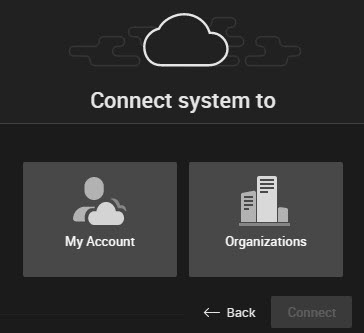
4.Click Connect to DW Cloud and login as an Organization Administrator
5.Select the Organizations tile.
6.Select the Organization the Site will be connected to.
7.The Site Administrator and the Organization Administrator must authenticate and approve the transfer..
Once connected, the Site will be displayed in the DW Cloud Portal and will be accessible by Cloud users granted access to the Site.
To Disconnect a Site from the Organization
NOTE: Disconnecting a Site from an Organization will remove access for all Cloud Users that this Site is shared and all Services will be removed from the Site.
The process of disconnection is the same as Disconnecting a Site from DW Cloud.
