DW Spectrum User Manual
The Enterprise Edition of DW Spectrum provides a suite of subscription services, include the the recording of a device stream.
The following conditions must be set before a Site can use available Services:
1.The Site must support Subscription Services by joining an Enterprise Edition Organization. See "Connecting a Site to an Organization".
2.There must be Services available to the Site.
One Recording Services is marked as in-use for each camera where recording is enabled. See "Recording".
Sites that are connected to an Organization have a tab labeled Services within the Site Administration dialog. This tab displays the state of the Services, the names of available Services, and a count of total and used Services for each Service type.
NOTE:Remove Services from Site devices before an Organization Administrator or Channel Partner reduces the amount of total available Services to prevent the Site from auto-selecting the devices that have Services removed.
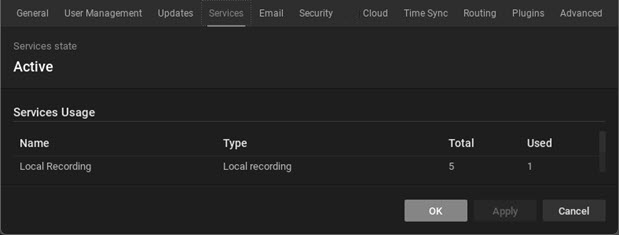
Services provided to an Organization can be set to the following states:
State |
Functional Description |
|---|---|
Active |
This is the fully operational State for Sites in an Organization. All users can access their Sites via the Cloud Portal, the Desktop Client, and the Web Admin (when on the same local network as the Site). Recording Services are running as configured within the Camera Settings. |
Suspended |
Limits access to Sites while keeping all Services running. User access via the Cloud Portal is not permitted. Only the Desktop Client or Web Admin interface can be used to access Sites over the local network. |
Shutdown |
Stops all Services and disables all Cloud Portal access. Site can only be access by using the Desktop Client or Web Admin (when on the same local network as the Site). |
