DW Spectrum User Manual
The Playback Panel provides archive and local file playback controls, extensive search capabilities, and seamless transition from live to archived footage.
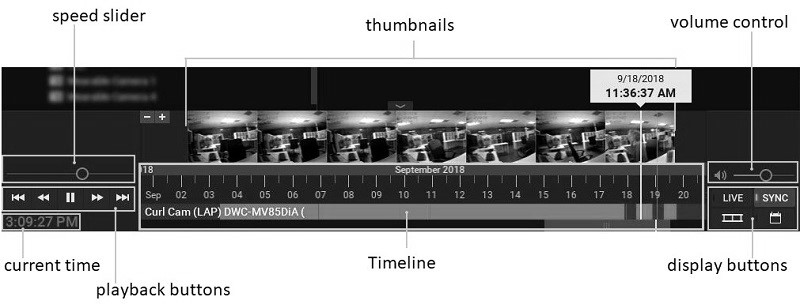
•Current time – displays the current time from your computer.
•Playback buttons – use to start, stop, and control playback speed.
•Speed Slider – alternate control for playback speed.
•Timeline – controls navigation through archive footage. See "Using the Timeline".
•Thumbnails – drag the upper edge of the Timeline upward to display preview thumbnails. See "Using Thumbnails".
•Display buttons:
oLIVE – switches selected camera(s) to live playback mode. See "Parts of the Timeline".
oSYNC – performs time synchronization of all cameras displayed on the current layout. See "Synchronizing Playback".
o – use to filmstrip icon to show or hide thumbnails above the Timeline.
o – use to calendar icon to open the archive navigation Calendar Control".
•Volume control – adjusts audio volume of the client application. See "Adjusting Volume".
NOTE: Users must have the Play Audio permission, either directly assigned, or through group membership to play audio.
