DW Spectrum User Manual
Key Concepts:
•As a default setting, all included and new events are scheduled continuous monitoring (24 hours a day, 7 days a week).
•Site-generated events are always being monitored and cannot be placed on a schedule.
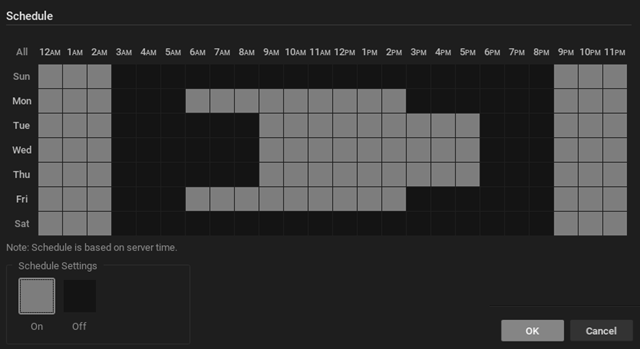
•The monitoring of user-defined events can be set to run in one-hour increments that span a repeating 7 day week.
•A common schedule can be bulk applied to multiple rules when done from the Event Rules List.
•It is possible to disable a rule entirely by setting every hour of the week to be OFF.
To Set an Event Schedule:
1.Open the scheduling widget from within the event rule dialog, or from the event list where bulk scheduling is possible.
2.Click the On or Off button to determine monitoring behavior in specific 1-hour cells from 12AM to 11PM.
3.Click in a cell to apply the selected schedule setting to cells, or use these shortcuts to apply to multiple cells:
•Click-and-drag to select multiple cells.
•Click the hour heading to select an entire column.
•Click the day of the week to select an entire row.
•Click All to select all cells.
4.Click OK to accept or Cancel to discard changes.ads