DW Spectrum User Manual
Users can select to receive any notifications, one of two types of notifications, or a customized list of selected notifications by clicking on the notification types listed below the notifications icon and label.
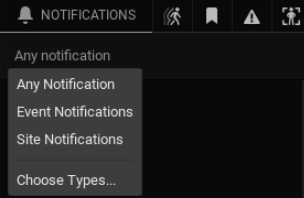
Types of notifications:
•Event Notifications are generated when an event rule is true and valid.
•Site Notifications are generated when specific Site conditions are present.
oSite Notifications are pinned to the top of the tile section display and include the state of a Site component.
oMost tiles will open the related settings or dialog screen when clicked.
oResolution suggestions are provided where possible/
NOTE: Users can disabled selected notifications using the Notification Suppression dialog.
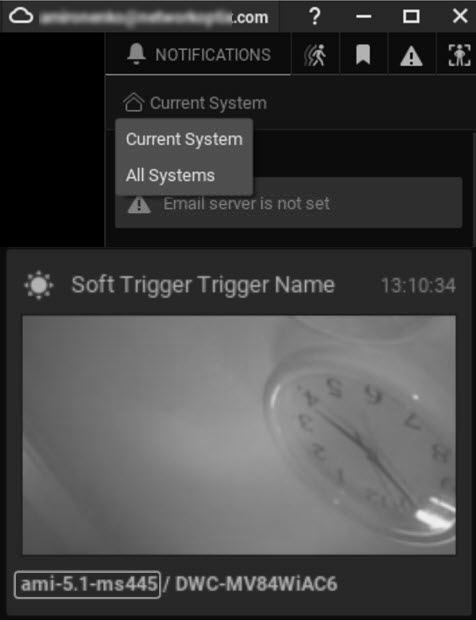
Sites that are connected within a common Organization will display notifications and informers from all Sites in the Organization, when Cross Site Notifications are enabled.
Key Concepts:
•Users must be logged into the Cloud to receive Cross Site Notifications.
•The Desktop Client will only display communications from Sites that the current user has access to.
•The Cross Site Notification selector is only displayed while logged into the Cloud and when compatible Sites are available.
•Cross Site Notifications must be enabled each time the Desktop Client is restarted – this setting is not saved.
•Notification footers are prefixed with the Site ID instead of the Camera IP Address provided with local Notifications.
•Cross Site Notifications are initiated by the Event Action Show Desktop Notification and adhere to other Event Rules (distribution, timing).
NOTE: If 2FA is required on the Site generating a cross site notification and the receiving user is not authenticated, then the user will be provided an informative dialog and the option to authenticate and enable receipt of notifications from the Site generating (2FA) notifications.
To enable or disable Cross Site Notifications
1.Select the Notifications tab in the right panel.
2.Under the tab title (Notifications) select All Sites to enable or Current Site to disable Cross Sites Notifications.